Sound Amplifier
- 3.6
- Rating
- 100.00M
- Installs
- Free
- Price

 Analysis by App-foxy
I found Sound Amplifier most useful when I stopped thinking of it as a general audio enhancer and started treating it as a focused communication aid. It is a free Android app from Google LLC in the communication category, designed to make nearby speech and other surrounding sounds easier to hear through a connected listening device or the phone itself. That narrow purpose is also its biggest strength: it can help in a noisy room, during a quiet conversation, or when ordinary phone audio feels too weak.
My experience was positive, but not universally effortless. The app does not replace a hearing aid, a medical assessment, or a good pair of headphones. Instead, it gives you a practical way to adjust how sound reaches you. I would recommend it to someone who occasionally struggles with speech clarity, to a family member helping another person follow a conversation, or to anyone who wants a simple listening tool without paying for an app. I would be more cautious about recommending it to someone who expects studio-quality processing, automatic correction in every environment, or a complete accessibility solution.
How Sound Amplifier feels to use in everyday situations
I find Sound Amplifier easiest to judge in ordinary moments rather than by turning every control up at once. I’d begin with one familiar speaker and a quiet room, then notice whether the phone’s placement or a small adjustment helps more than extra volume. That first test gives a useful baseline before considering how well the setup fits into recurring routines.
You May Also Like

 Pandora - Music & Podcasts
Pandora’s Music Is Easy to Start, but Harder to Recover
Pandora’s strength is its low-effort path from a seed to a station. Its weak spot is how much confidence it asks you to place in connection, setup, and quiet recovery.

 AccuWeather: Weather Radar
AccuWeather Review: A Quick, Clear Forecast for Everyday Decisions
For everyday plans, the best forecast is the one you can understand quickly. AccuWeather makes rain timing, radar, and local conditions easy to act on, with a few trade-offs.

 Hill Climb Racing
Why Hill Climb Racing Still Turns Crashes Into One More Run
A tiny car, a bumpy hill and one more upgrade: Hill Climb Racing keeps resurfacing because its simple chaos makes every near-miss feel personal.

 AliExpress - Shopping App
AliExpress Makes Global Shopping Feel Personal, but Shoppers Bear the Risk
AliExpress turns a global marketplace into a pocket-sized discovery engine. Its reach is useful, its shopping loop compelling, and its trade-offs easy to miss.

 Lords Mobile: Kingdom Wars
Lords Mobile Is a Kingdom-Building Routine, Not a Quick Match
A case-by-case verdict on the building, battles, device demands, and social commitments that make Lords Mobile rewarding for some players and exhausting for others.

 PDF Scanner app - TapScanner
TapScanner Makes Paperwork Easier to Capture, Check, and Share
TapScanner makes scanning with a phone feel less like a rescue operation and more like a dependable step in getting work done. Its capture tools are useful, though not flawless.
More From Our News Desk
View All News


Readability and navigation that stay out of the way
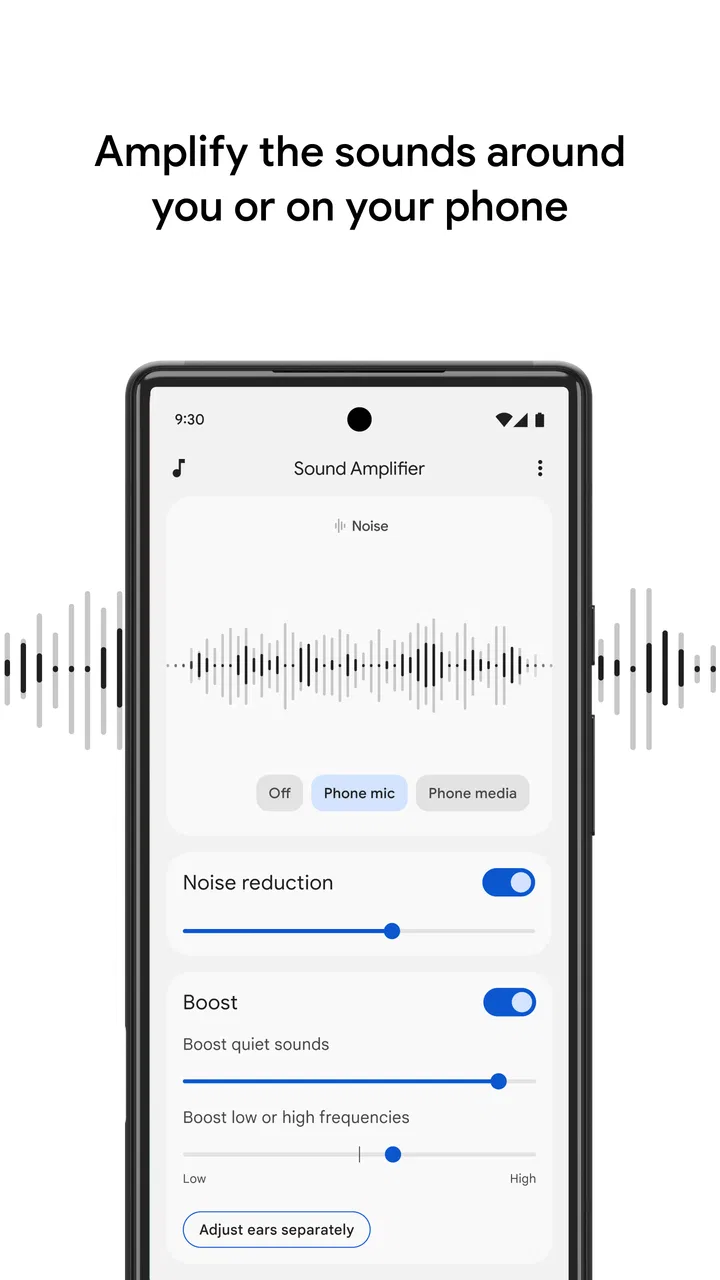
The interface is built around a small number of useful decisions rather than a crowded control panel. That matters here because the person using the app may already be concentrating on a conversation, a television program, or the sounds around them. I did not feel pushed through a complicated setup before reaching the controls that actually affect listening.
The most important adjustment is the balance between making sound more noticeable and keeping it comfortable. I found it better to change one control at a time and listen for a few seconds before making another adjustment. Raising everything at once can make background noise more prominent without making the speaker easier to understand. A slower approach produces a more natural result and makes it easier to remember which setting helped.
For a person with low vision, the practical question is not only whether the controls can be seen, but whether they can be understood quickly. The app’s limited purpose helps because there are fewer choices to interpret than in a full equalizer or audio-editing tool. Still, anyone who relies heavily on large text, screen magnification, or spoken navigation should test the controls on their own phone. The experience can depend on the device, Android version, display settings, and the listening accessory being used.
I also appreciate that this is not an app where you need to browse through content before getting value from it. There are no feeds, messages, profiles, or distracting media sections competing for attention. You open it for sound, make an adjustment, and return to the conversation. That directness is especially helpful for an older relative who may find multi-purpose apps tiring to navigate.
One useful habit is to create a small personal routine: connect the listening device first, open the app, begin with a moderate level, and then adjust while the other person speaks. Doing this before an important appointment or group conversation reduces the chance of trying to solve the problem while everyone is waiting. I would not rely on memory alone if several people use the same phone, because a setting that works for one listener may be uncomfortable for another.
Motor and sensory considerations
Sound Amplifier can reduce the physical effort involved in trying to hear, but it does not remove every interaction challenge. The user still needs to open the app, change controls, and manage the phone or connected audio equipment. For someone with limited dexterity, small touch targets or accidental swipes may be frustrating. A phone stand, a stable surface, and a short practice session can make the process less demanding than holding the device throughout a conversation.
The app is most comfortable when adjustments are made gradually. Sudden increases in volume can be startling, particularly for someone sensitive to loud sounds. I recommend beginning quietly and increasing only until speech becomes more distinct. If voices become harsh, metallic, or tiring, lowering the amplification is usually more useful than continuing to raise it. Amplification is not the same thing as clarity, and more sound is not always better sound.
There is also a sensory trade-off. In a calm room, bringing a speaker forward can feel genuinely helpful. In a busy café, however, the same process may bring cups, chairs, ventilation, and nearby conversations forward too. The result can be a louder version of the original problem. I found that the app makes the most sense when the listener has at least some control over where the phone is placed and which sound source matters most.
A simple but non-obvious workflow is to place the phone closer to the person speaking rather than keeping it beside the listener. That can improve the usefulness of the app without immediately increasing the volume. It also lets the listener keep the phone still, which is easier for people with hand tremors or fatigue. The trade-off is social: the speaker may need to understand why the phone is positioned between you, so a brief explanation can prevent awkwardness.
For people who use headphones or another listening device, comfort and fit remain just as important as the app controls. A poor fit can create muffled sound, pressure, or feedback-like distractions that no adjustment inside the app can fully solve. I would test the setup for a short period at home before using it in a medical office, classroom, or public event.
Situational access: where it helps most
The strongest use case I found is a one-to-one conversation in a place with manageable background noise. Imagine sitting across from a family doctor or speaking with a receptionist at a counter. The user can place the phone nearer to the speaker, listen through the chosen audio device, and adjust the sound without asking the other person to repeat every sentence. It does not guarantee perfect understanding, but it can reduce the strain of following the exchange.
It can also be useful during television viewing when the problem is not simply that the program is too quiet. Some viewers turn the volume up until everyone else in the room is uncomfortable, while dialogue still seems unclear. Sound Amplifier offers another approach: the listener can use a personal listening setup and work on making speech more prominent without forcing the entire room to accept a louder television.
Another practical situation is helping a relative participate in a family conversation. Rather than passing the phone around constantly, one person can keep it near the current speaker while the listener uses their own audio device. This works best with a small group and clear turn-taking. It becomes less effective when several people speak at once, because the app cannot know which voice matters most.
The app’s communication focus also makes it relevant for quiet sounds that are easy to miss, such as a person speaking from another part of a room or a television at a low level. I would still avoid treating it as a safety monitor. A phone-based listening aid is not a dependable replacement for awareness of alarms, traffic, doorbells, or emergency announcements. Situational access is valuable, but it has limits that matter when missing a sound could create danger.
It is worth remembering that the phone’s position changes the result. If it is in a pocket, under a cushion, or far from the speaker, the microphone is receiving a different sound picture than the listener is. Keeping the phone exposed and oriented toward the important source is one of the simplest improvements. This is easy to overlook because people naturally focus on the headphones and forget that the phone is doing the listening first.
How it compares with ordinary alternatives
Compared with simply raising the volume, Sound Amplifier gives the listener more control over the listening experience without requiring everyone nearby to hear the same loud output. That is its clearest everyday advantage. It is also more focused than a music equalizer, which may change bass and treble but is not necessarily designed around understanding nearby speech.
Compared with a dedicated hearing aid, the app is more accessible financially because it is free, but it is less specialized. A hearing aid is designed to remain part of a person’s regular hearing routine, while this app depends on a phone, a compatible listening setup, battery life, and the user’s ability to manage the controls. Someone with persistent hearing difficulty should not assume that a phone app can provide the fitting, consistency, and professional support of dedicated equipment.
Compared with asking another person to repeat themselves, the app can make a conversation feel less interrupted. That benefit is real, but it should not create pressure to hide a hearing difficulty. Clear speech, good lighting, reduced background noise, and facing the listener are still valuable. In many cases, combining those simple human adjustments with the app works better than relying on amplification alone.
Sound Amplifier is also different from a recording app. I see it as a live listening tool, not a way to create a transcript or preserve a conversation for later review. If your main need is searchable notes, captions, or recorded audio, a different type of communication app will be a better match. Choosing it for those tasks would lead to disappointment because its value is immediate listening rather than documentation.
Remaining barriers and situations where I would skip it
The first barrier is setup dependency. The app may be free, but the complete experience still depends on the phone and the way sound is delivered to the listener. A person who dislikes managing Bluetooth accessories, cables, charging, or phone placement may find a dedicated device simpler. The app lowers the cost of trying an amplification approach, but it does not make the surrounding hardware irrelevant.
The second barrier is inconsistency across environments. A quiet living room and a crowded restaurant present very different audio problems. In a noisy setting, amplification can increase unwanted sound as well as speech. If the listener becomes more fatigued after using it, that is a sign to change the environment, move closer to the speaker, lower the level, or stop using it rather than assuming the setting needs to be pushed higher.
I would also skip it for anyone expecting medical guidance. The app belongs to communication software, not diagnosis or treatment. New, sudden, one-sided, painful, or rapidly worsening hearing problems deserve professional attention. Even for long-term difficulty, a hearing specialist can offer advice that an app cannot, especially when the listener needs a consistent solution throughout the day.
Group conversations are another weak point. The app can help when there is a clear primary speaker, but it cannot understand social context and choose the right voice for you. In a meeting, classroom, or dinner with overlapping speech, the listener may still miss comments even if the overall sound is louder. Sitting where faces are visible, asking people to speak one at a time, and reducing nearby noise may provide more benefit than changing the controls repeatedly.
Privacy and social comfort can matter too, even without making assumptions about the app’s policies. Pointing a phone toward someone while listening may invite questions, and some people may feel self-conscious using a visible aid. I think the best approach is to explain it simply: the phone helps make speech easier to hear. That turns an unfamiliar action into a normal accommodation and can encourage others to speak clearly instead of treating the device as a problem.
Who should try it first
I think Sound Amplifier is a sensible first experiment for an Android user who sometimes struggles with speech, especially in one-to-one situations. It is also worth considering for a caregiver or family member who wants to help someone hear television or conversation without immediately purchasing specialized equipment. The free price removes much of the risk of trying it, although the person should still judge comfort and clarity rather than assuming the app will work equally well for everyone.
It is less suitable for someone who needs an always-on hearing solution, who regularly works in loud environments, or who wants automatic captions and written records. It may also be a poor fit for someone who cannot comfortably operate a phone or manage the listening accessory without help. In those cases, a simpler dedicated device, professional hearing support, or a captioning-focused option may be more appropriate.
The app is available to an Everyone audience and has been on the platform since early 2019. Its broad availability is useful because family members can help with the first setup, and the app has reached over one hundred million installs. Its average rating is around 3.6, which matches my balanced impression: many people can find a practical benefit, but the experience depends heavily on hearing needs, phone hardware, surroundings, and expectations.
My advice is to test it in three stages. Start in a quiet room with one speaker, then try a television or a mildly busy space, and finally decide whether the setup remains comfortable after several minutes. During each test, pay attention to speech clarity, background noise, listening fatigue, and how easy it is to make a small adjustment. That process tells you more than simply checking whether the volume became louder.
An inclusive verdict based on real use
I came away seeing Sound Amplifier as a useful bridge rather than a complete answer. It supports more inclusive conversations by giving some listeners a way to participate with less repetition and less dependence on raising the volume for everyone. Its focused controls, free access, and communication-oriented design make it approachable, particularly for occasional needs.
At the same time, inclusive design has to account for the person’s whole situation. A listener may have difficulty seeing controls, holding a phone, tolerating amplified background noise, managing accessories, or using the app in a group. Sound Amplifier helps with one part of that chain: the way surrounding audio reaches the listener. It cannot solve every physical, sensory, environmental, or social barrier around communication.
For me, the deciding question is simple: do you need a flexible way to make nearby speech easier to follow on an Android phone, and are you comfortable testing the setup patiently? If yes, I think it is worth trying. Keep the phone close to the important speaker, begin with gentle changes, and judge clarity rather than loudness. If your needs are constant, medically significant, or tied to crowded group settings, I would look beyond the app.
My final recommendation is cautious but positive: Sound Amplifier is a practical communication aid for specific moments, not a replacement for professional hearing support. Used with realistic expectations, it can make everyday conversations, television listening, and family interactions more manageable while respecting the different ways people access sound.
FAQs for Sound Amplifier
01What is Sound Amplifier, and how does it work?
Sound Amplifier is an app designed to enhance audio experiences by amplifying and clarifying sounds from your surroundings or media. It uses advanced algorithms to filter and boost audio frequencies, making it easier for users to hear conversations, music, or media content more clearly, especially in noisy environments.
02Is Sound Amplifier compatible with all Android and iOS devices?
Sound Amplifier is compatible with most modern Android and iOS devices. However, it’s essential to check the specific system requirements on the app's download page to ensure your device supports the app, as older devices or those with outdated operating systems may not be compatible.
03Can Sound Amplifier help with hearing impairments?
Yes, Sound Amplifier can be particularly beneficial for individuals with hearing impairments. By amplifying and clarifying sounds, it can help users better hear conversations and other important audio cues in various environments, offering a more inclusive and accessible auditory experience.
04Does Sound Amplifier require an internet connection to function?
Sound Amplifier primarily works offline as it processes audio through your device's hardware. However, an internet connection may be needed for initial setup, updates, or accessing certain features that might be cloud-based. Always check the app details for specific requirements.
05How customizable are the settings in Sound Amplifier?
Sound Amplifier offers a range of customizable settings to suit individual preferences. Users can adjust sound frequencies, noise reduction levels, and other audio parameters. This flexibility allows you to personalize the listening experience, ensuring optimal sound clarity and comfort tailored to your needs.
Pros
- Enhances audio clarity significantly.
- User-friendly interface with simple controls.
- Customizable settings for personalized use.
- Effective noise reduction capabilities.
- Works well with Bluetooth devices.
Cons
- Limited to certain Android versions.
- Occasional connectivity issues reported.
- Consumes noticeable battery power.
- May require frequent manual adjustments.
- Not available on iOS platform.

Sound Amplifier
Gallery